
Mesh.SetData
void SetData(T[] vertices, UInt32[] indices, bool calculateBounds)
Assigns vertices with a custom vertex format along with face indices for this Mesh in a single call! The format is derived from T’s [VertComponent] tagged fields, see SetVerts for details.
Calling SetData is slightly more efficient than calling SetVerts and SetInds separately.
| T[] vertices | An array of vertices to add to the mesh. |
| UInt32[] indices | A list of face indices, must be a multiple of 3. Each index represents a vertex from the provided vertex array. |
| bool calculateBounds | If true, this will also update the Mesh’s bounds based on the vertices provided. This requires the format to contain a float3 position component. |
void SetData(T[] vertices, UInt32[] indices, MeshData flags, int priority)
Assigns vertices with a custom vertex format along with face indices for this Mesh in a single call, with control over upload behavior via flags! Upload is synchronous by default — pass MeshData.Async for background upload. The format is derived from T’s [VertComponent] tagged fields, see SetVerts for details.
| T[] vertices | An array of vertices to add to the mesh. |
| UInt32[] indices | A list of face indices, must be a multiple of 3. Each index represents a vertex from the provided vertex array. |
| MeshData flags | Flags controlling upload behavior. See MeshData for options. |
| int priority | Loading priority for async upload. Lower values load sooner. |
Examples
Procedurally generating a wavy grid
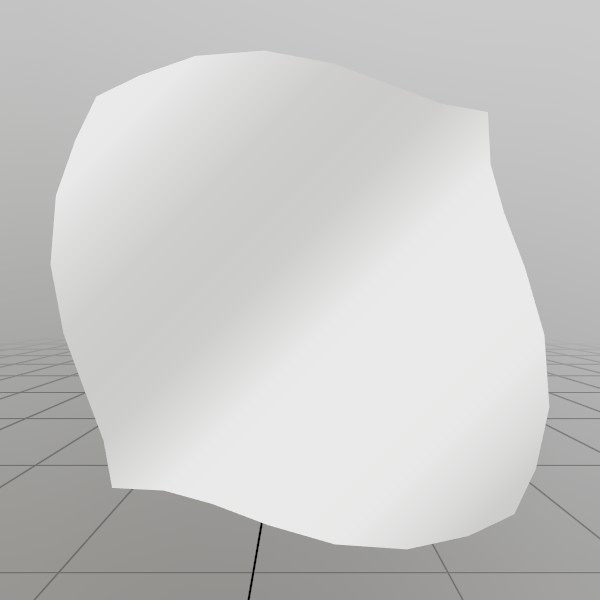
Here, we’ll generate a grid mesh using Mesh.SetVerts and Mesh.SetInds! This is a common example of creating a grid using code, we’re using a sin wave to make it more visually interesting, but you could also substitute this for something like sampling a heightmap, or a more interesting mathematical formula!
Note: x+y*gridSize is the formula for 2D (x,y) access of a 1D array that represents a grid.
const int   gridSize = 8;
const float gridMaxF = gridSize-1;
Vertex[] verts = new Vertex[gridSize*gridSize];
uint  [] inds  = new uint  [gridSize*gridSize*6];

for (int y = 0; y < gridSize; y++) {
for (int x = 0; x < gridSize; x++) {
	// Create a vertex on a grid, centered about the origin. The dimensions extends
	// from -0.5 to +0.5 on the X and Z axes. The Y value is then sampled from
	// a sin wave using the x and y values.
	//
	// The normal of the vertex is then calculated from the derivative of the Y
	// value!
	verts[x+y*gridSize] = new Vertex(
		new Vec3(
			x/gridMaxF-0.5f,
			SKMath.Sin((x+y) * 0.7f)*0.1f,
			y/gridMaxF-0.5f),
		new Vec3(
			-SKMath.Cos((x+y) * 0.7f),
			1,
			-SKMath.Cos((x+y) * 0.7f)).Normalized,
		new Vec2(
			x / gridMaxF,
			y / gridMaxF));

	// Create triangle face indices from the current vertex, and the vertices
	// on the next row and column! Since there is no 'next' row and column on
	// the last row and column, we guard this with a check for size-1.
	if (x<gridSize-1 && y<gridSize-1)
	{
		int ind = (x+y*gridSize)*6;
		inds[ind  ] = (uint)((x+1)+(y+1)*gridSize);
		inds[ind+1] = (uint)((x+1)+(y  )*gridSize);
		inds[ind+2] = (uint)((x  )+(y+1)*gridSize);

		inds[ind+3] = (uint)((x  )+(y+1)*gridSize);
		inds[ind+4] = (uint)((x+1)+(y  )*gridSize);
		inds[ind+5] = (uint)((x  )+(y  )*gridSize);
	}
} }
demoProcMesh = new Mesh(verts, inds);
Found an issue with these docs, or have some additional questions? Create an Issue on Github!