
RenderList.DrawNow
void DrawNow(Tex toRenderTarget, Matrix camera, Matrix projection, Color clearColor, RenderClear clear, Rect viewportPct, RenderLayer layerFilter, int materialVariant)
Draws the RenderList to a rendertarget texture immediately. It does not clear the list.
| Tex toRenderTarget | The rendertarget texture to draw to. |
| Matrix camera | A TRS matrix representing the location and orientation of the camera. This matrix gets inverted later on, so no need to do it yourself. |
| Matrix projection | The projection matrix describes how the geometry is flattened onto the draw surface. Normally, you’d use Matrix.Perspective, and occasionally Matrix.Orthographic might be helpful as well. |
| Color clearColor | If the clear parameter is set to clear the color of toRenderTarget, then this is the color it will clear to. default would be a transparent black. |
| RenderClear clear | Describes if and how the rendertarget should be cleared before rendering. Note that clearing the target is unaffected by the viewport, so this will clean the entire surface! |
| Rect viewportPct | Allows you to specify a region of the rendertarget to draw to! This is in normalized coordinates, 0-1. If the width of this value is zero, then this will render to the entire texture. |
| RenderLayer layerFilter | This is a bit flag that allows you to change which layers StereoKit renders for this particular render viewpoint. To change what layers a visual is on, use a Draw method that includes a RenderLayer as a parameter. |
| int materialVariant | Specifies which Material variant should be used for rendering. 0 will be the normal default material, any others will generally be application-defined by setting up each Material’s Variant with specific shaders. If a Material has no corresponding variant, it will not be drawn. |
void DrawNow(Tex toRenderTarget, Matrix camera, Matrix projection, RenderSettings settings)
This renders the RenderList to the rendertarget texture immediately, from the specified viewpoint, using a RenderSettings struct for everything else - including tile-friendly post-process effects! See Renderer.SetPostProcess for post-process shader requirements.
| Tex toRenderTarget | The rendertarget texture to draw to. |
| Matrix camera | A TRS matrix representing the location and orientation of the camera. This matrix gets inverted later on, so no need to do it yourself. |
| Matrix projection | The projection matrix describes how the geometry is flattened onto the draw surface. Normally, you’d use Matrix.Perspective, and occasionally Matrix.Orthographic might be helpful as well. |
| RenderSettings settings | Settings for this render pass, a default here means all layers, the default material variant, clear everything to transparent black, a full-target viewport, and no post-processing. |
void DrawNow(Tex toRenderTarget, Matrix[]& cameras, Matrix[]& projections, Color clearColor, RenderClear clear, Rect viewportPct, RenderLayer layerFilter, int materialVariant)
Multi-view variant of DrawNow. Renders the list once across multiple views in a single pass, with one camera + projection per view. Each view writes to its corresponding layer of the (array) render target. The number of views is capped at 6.
| Tex toRenderTarget | An array or cubemap rendertarget with at least cameras.Length layers. |
| Matrix[]& cameras | View transforms, one per view. Length must equal projections.Length and cannot exceed Renderer.MaxViews. |
| Matrix[]& projections | Projection matrices, one per view. Same length as cameras. |
| Color clearColor | If clear clears color, this is the color used. Default is transparent black. |
| RenderClear clear | Whether and how to clear the rendertarget before rendering. |
| Rect viewportPct | Subregion of the rendertarget to draw to, in normalized coordinates 0-1. Width of zero draws to the entire target. |
| RenderLayer layerFilter | Bit flag controlling which render layers are drawn this pass. |
| int materialVariant | Which material variant to use. 0 is the default; non-zero indexes into Material.Variants. |
void DrawNow(Tex toRenderTarget, Matrix[]& cameras, Matrix[]& projections, RenderSettings settings)
This renders the RenderList to the rendertarget texture immediately, from the specified viewpoint, using a RenderSettings struct for everything else - including tile-friendly post-process effects! See Renderer.SetPostProcess for post-process shader requirements.
| Tex toRenderTarget | The rendertarget texture to draw to. |
| RenderSettings settings | Settings for this render pass, a default here means all layers, the default material variant, clear everything to transparent black, a full-target viewport, and no post-processing. |
| Matrix[]& cameras | View transforms, one per view. Length must equal projections.Length and cannot exceed Renderer.MaxViews. |
| Matrix[]& projections | Projection matrices, one per view. Same length as cameras. |
Examples
Render Icon From a Model
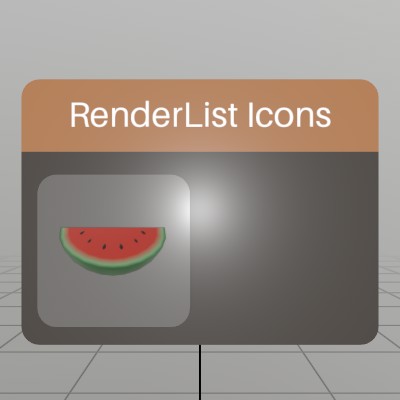
One place where RenderList excels, is at rendering icons or previews of Models or scenes! This snippet of code will take a Model asset, and render a preview of it into a small Sprite.
static Sprite MakeIcon(Model model, int resolution)
{
	RenderList list   = new RenderList();
	Tex        result = Tex.RenderTarget(resolution, resolution, 8);

	// Calculate a standard size that will fill the icon to the edges,
	// based on the camera parameters we pass to DrawNow.
	float scale = 1/model.Bounds.dimensions.Length;

	list.Add(model, Matrix.TS(-model.Bounds.center*scale, scale), Color.White);

	list.DrawNow(result,
		Matrix.LookAt(V.XYZ(0,0,-1), Vec3.Zero, Vec3.Up),
		Matrix.Perspective(45, 1, 0.01f, 10));

	// Clearing isn't _necessary_ here, but DrawNow does not clear the list
	// after drawing! This will free up assets that were referenced in the
	// list without waiting for GC to destroy the RenderList object.
	list.Clear();

	return Sprite.FromTex(result.Copy());
}
From there, it’s pretty easy to load a Model up, and draw it on a button in the UI.
Sprite icon;
public void Initialize()
{
	Model model = Model.FromFile("Watermelon.glb");
	// Model loading is async, so we want to make sure the Model is fully
	// loaded before comitting it to a Sprite!
	Assets.BlockForPriority(int.MaxValue);
	icon = MakeIcon(model, 128);
}

Pose windowPose = new Pose(0,0,-0.5f, Quat.LookDir(0,0,1));
void ShowWindow()
{
	UI.WindowBegin("RenderList Icons", ref windowPose);
	UI.ButtonImg("Icon", icon, UIBtnLayout.CenterNoText, V.XX(UI.LineHeight*2));
	UI.WindowEnd();
}
Found an issue with these docs, or have some additional questions? Create an Issue on Github!