
Tex.SetColors
void SetColors(int width, int height, IntPtr data)
Set the texture’s pixels using a pointer to a chunk of memory! This is great if you’re pulling in some color data from native code, and don’t want to pay the cost of trying to marshal that data around.
| int width | Width in pixels of the texture. Powers of two are generally best! |
| int height | Height in pixels of the texture. Powers of two are generally best! |
| IntPtr data | A pointer to a chunk of memory containing color data! Should be widthheightsize_of_texture_format bytes large. Color data should definitely match the format provided when constructing the texture! |
void SetColors(int width, int height, int depth, IntPtr data)
Set the contents of a 3D (volume) texture from a contiguous block of memory. The texture must be created with TexType.Volume. Pass IntPtr.Zero to allocate an empty volume (e.g. for use as a compute UAV). Slice-major layout: all of slice 0, then slice 1, etc., each slice being width*height pixels of the texture’s format.
| int width | Width in pixels. |
| int height | Height in pixels. |
| int depth | Depth in pixels (number of slices). |
| IntPtr data | A pointer to widthheightdepth pixels of the texture’s format, or IntPtr.Zero to allocate an empty volume. |
void SetColors(int width, int height, int depth, Byte[]& data)
Set the contents of a 3D (volume) texture from a byte array. The texture must be created with TexType.Volume and a single-channel format such as R8. Slice-major layout: all of slice 0, then slice 1, etc., each slice being width*height bytes.
| int width | Width in pixels. |
| int height | Height in pixels. |
| int depth | Depth in pixels (number of slices). |
| Byte[]& data | An array of widthheightdepth bytes. |
void SetColors(int width, int height, Color32[]& data)
Set the texture’s pixels using a color array! This function should only be called on textures with a format of Rgba32 or Rgba32Linear. You can call this as many times as you’d like, even with different widths and heights. Calling this multiple times will mark it as dynamic on the graphics card. Calling this function can also result in building mip-maps, which has a non-zero cost: use TexType.ImageNomips when creating the Tex to avoid this.
| int width | Width in pixels of the texture. Powers of two are generally best! |
| int height | Height in pixels of the texture. Powers of two are generally best! |
| Color32[]& data | An array of 32 bit colors, should be a length of width*height. |
void SetColors(int width, int height, Color[]& data)
Set the texture’s pixels using a color array! This function should only be called on textures with a format of Rgba128. You can call this as many times as you’d like, even with different widths and heights. Calling this multiple times will mark it as dynamic on the graphics card. Calling this function can also result in building mip-maps, which has a non-zero cost: use TexType.ImageNomips when creating the Tex to avoid this.
| int width | Width in pixels of the texture. Powers of two are generally best! |
| int height | Height in pixels of the texture. Powers of two are generally best! |
| Color[]& data | An array of 128 bit colors, should be a length of width*height. |
void SetColors(int width, int height, Byte[]& data)
Set the texture’s pixels using a scalar array! This function should only be called on textures with a format of R8. You can call this as many times as you’d like, even with different widths and heights. Calling this multiple times will mark it as dynamic on the graphics card. Calling this function can also result in building mip-maps, which has a non-zero cost: use TexType.ImageNomips when creating the Tex to avoid this.
| int width | Width in pixels of the texture. Powers of two are generally best! |
| int height | Height in pixels of the texture. Powers of two are generally best! |
| Byte[]& data | An array of 8 bit values, should be a length of width*height. |
void SetColors(int width, int height, UInt16[]& data)
Set the texture’s pixels using a scalar array! This function should only be called on textures with a format of R16. You can call this as many times as you’d like, even with different widths and heights. Calling this multiple times will mark it as dynamic on the graphics card. Calling this function can also result in building mip-maps, which has a non-zero cost: use TexType.ImageNomips when creating the Tex to avoid this.
| int width | Width in pixels of the texture. Powers of two are generally best! |
| int height | Height in pixels of the texture. Powers of two are generally best! |
| UInt16[]& data | An array of 16 bit values, should be a length of width*height. |
void SetColors(int width, int height, Single[]& data)
Set the texture’s pixels using a scalar array! This function should only be called on textures with a format of R32. You can call this as many times as you’d like, even with different widths and heights. Calling this multiple times will mark it as dynamic on the graphics card. Calling this function can also result in building mip-maps, which has a non-zero cost: use TexType.ImageNomips when creating the Tex to avoid this.
| int width | Width in pixels of the texture. Powers of two are generally best! |
| int height | Height in pixels of the texture. Powers of two are generally best! |
| Single[]& data | An array of 32 bit values, should be a length of width*height. |
void SetColors(int width, int height, IntPtr[] arrayData, int mipCount, int multisample)
Set the texture’s pixels for a multi-layer and/or
mip-mapped texture, using an array of pointers. Each pointer in
arrayData represents one layer (face for cubemaps, slice for array
textures), and points to a tightly packed block containing all mip
levels for that layer in the order [mip0][mip1][mip2].... The
memory layout per mip should match the texture’s format. This is the
raw pointer variant for advanced use cases like uploading
pre-decoded image data from native code.
| int width | Width in pixels of mip 0. Powers of two are generally best! |
| int height | Height in pixels of mip 0. Powers of two are generally best! |
| IntPtr[] arrayData | An array of arrayCount pointers, one per layer. Each layer points to packed mip data [mip0][mip1][mip2].... |
| int mipCount | The number of mip levels packed into each layer’s data. Use 1 if no mip data is provided beyond the base. |
| int multisample | Multisample count, only relevant for rendertarget textures. |
void SetColors(int width, int height, Color32[][]& arrayData, int mipCount, int multisample)
Set the texture’s pixels for a multi-layer and/or
mip-mapped texture using a jagged color array. Each entry in
arrayData is one layer (face for cubemaps, slice for array
textures), packed as [mip0][mip1][mip2].... This function should
only be called on textures with a format of Rgba32 or Rgba32Linear.
| int width | Width in pixels of mip 0. Powers of two are generally best! |
| int height | Height in pixels of mip 0. Powers of two are generally best! |
| Color32[][]& arrayData | A jagged array where each arrayData[layer] contains all mip levels for that layer, packed as [mip0][mip1][mip2]... with mip 0 sized width*height, mip 1 sized (width/2)*(height/2), and so on. |
| int mipCount | The number of mip levels packed into each layer’s data. Use 1 if no mip data is provided beyond the base. |
| int multisample | Multisample count, only relevant for rendertarget textures. |
void SetColors(int width, int height, Byte[][]& arrayData, int mipCount, int multisample)
Set the texture’s pixels for a multi-layer and/or
mip-mapped texture using a jagged byte array. Each entry in
arrayData is one layer (face for cubemaps, slice for array
textures), packed as [mip0][mip1][mip2].... The byte layout per
mip should match the texture’s format.
| int width | Width in pixels of mip 0. Powers of two are generally best! |
| int height | Height in pixels of mip 0. Powers of two are generally best! |
| Byte[][]& arrayData | A jagged array where each arrayData[layer] contains all mip levels for that layer as bytes, packed as [mip0][mip1][mip2].... |
| int mipCount | The number of mip levels packed into each layer’s data. Use 1 if no mip data is provided beyond the base. |
| int multisample | Multisample count, only relevant for rendertarget textures. |
Examples
Creating a texture procedurally
It’s pretty easy to create an array of colors, and just pass that into an empty texture! Here, we’re building a simple grid texture, like so:
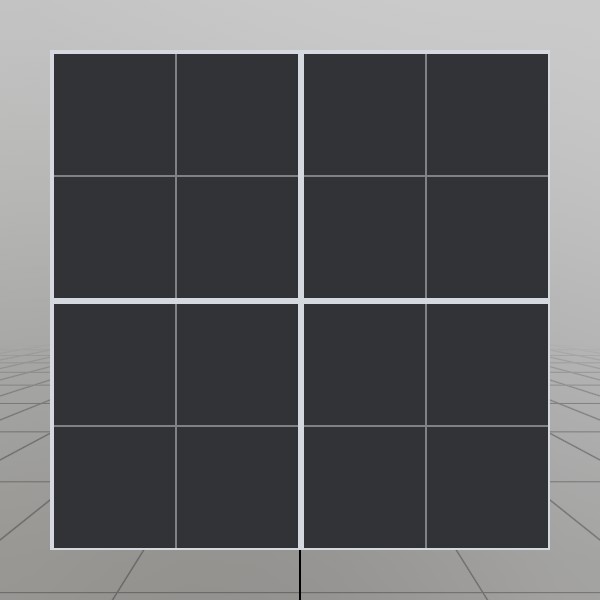
You can call SetTexture as many times as you like! If you’re calling it frequently, you may want to keep the width and height consistent to prevent from creating new texture objects. Use TexType.ImageNomips to prevent StereoKit from calculating mip-maps, which can be costly, especially when done frequently.
// Create an empty texture! This is TextType.Image, and
// an RGBA 32 bit color format.
Tex gridTex = new Tex();

// Use point sampling to ensure that the grid lines are
// crisp and sharp, not blended with the pixels around it.
gridTex.SampleMode = TexSample.Point;

// Allocate memory for the pixels we'll fill in, powers
// of two are always best for textures, since this makes
// things like generating mip-maps easier.
int width  = 128;
int height = 128;
Color32[] colors = new Color32[width*height];

// Create a color for the base of the grid, and the
// lines of the grid
Color32 baseColor    = Color.HSV(0.6f,0.1f,0.25f);
Color32 lineColor    = Color.HSV(0.6f,0.05f,1);
Color32 subLineColor = Color.HSV(0.6f,0.05f,.6f);

// Loop through each pixel
for (int y = 0; y < height; y++) {
for (int x = 0; x < width;  x++) {
	// If the pixel's x or y value is a multiple of 64, or
	// if it's adjacent to a multiple of 128, then we
	// choose the line color! Otherwise, we use the base.
	if (x % 128 == 0 || (x+1)%128 == 0 || (x-1)%128 == 0 ||
		y % 128 == 0 || (y+1)%128 == 0 || (y-1)%128 == 0)
		colors[x+y*width] = lineColor;
	else if (x % 64 == 0 || y % 64 == 0)
		colors[x+y*width] = subLineColor;
	else
		colors[x+y*width] = baseColor;
} }

// Put the pixel information into the texture
gridTex.SetColors(width, height, colors);
Found an issue with these docs, or have some additional questions? Create an Issue on Github!